
A new phishing campaign is impersonating secure‑document platforms, using a fabricated “shared folder” workflow to lure recipients into a multi‑step web flow designed to trick them into authorising a malicious third‑party app with full access to their Microsoft account.
The email itself is deliberately ordinary. It arrives with a neutral operational heading such as “Auto‑Receipt || The requested submittals for this quote Replacements READY FOR REVIEW”, styled to resemble a routine document‑completion or e‑signature notification.
The body advises the recipient that a document is ready to review and sign, accompanied by a blue View & Complete Item button. A “Document Invite” reference reinforces the illusion of legitimacy.
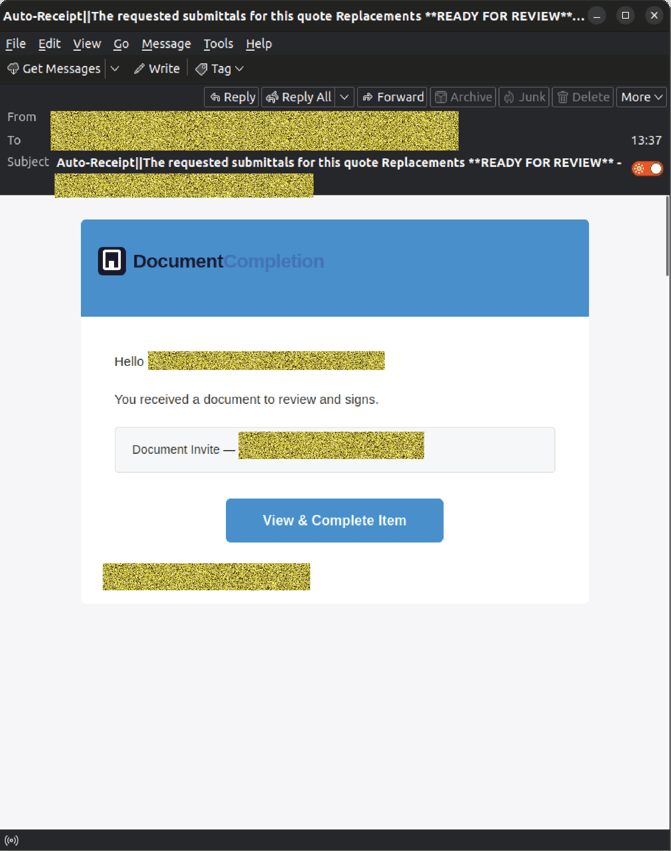
Example phishing content shown using document‑workflow branding. Not affiliated with any legitimate provider.
Behind the branding, the sender details tell a different story:
- Display name: RecordsTeam
- Display address: kensuke.n(at)nakabayashi-co.com
- Sending address: kensuke.n(at)nakabayashi-co.com
None of these align with legitimate document‑signing or file‑sharing infrastructure, but the email is styled convincingly enough that a busy staff member could easily miss the mismatch.
Inside the phishing flow
Clicking the button leads to a multistage redirect chain designed to appear trustworthy:
- link(dot)edgepilot(dot)com
- secure-web(dot)cisco(dot)com
- artemisabeach[dot]com /(dot)well-known__e71c118/pki-validation/gqazbvcb
By routing through recognised services, attackers aim to bypass basic checks and reduce suspicion.
Step 1: Fake Dropbox “Shared Folder” page
The first landing page impersonates Dropbox, claiming that a secure folder has been shared and prompting the user to Access Folder to view a file such as Client_Assets_2026.zip. .
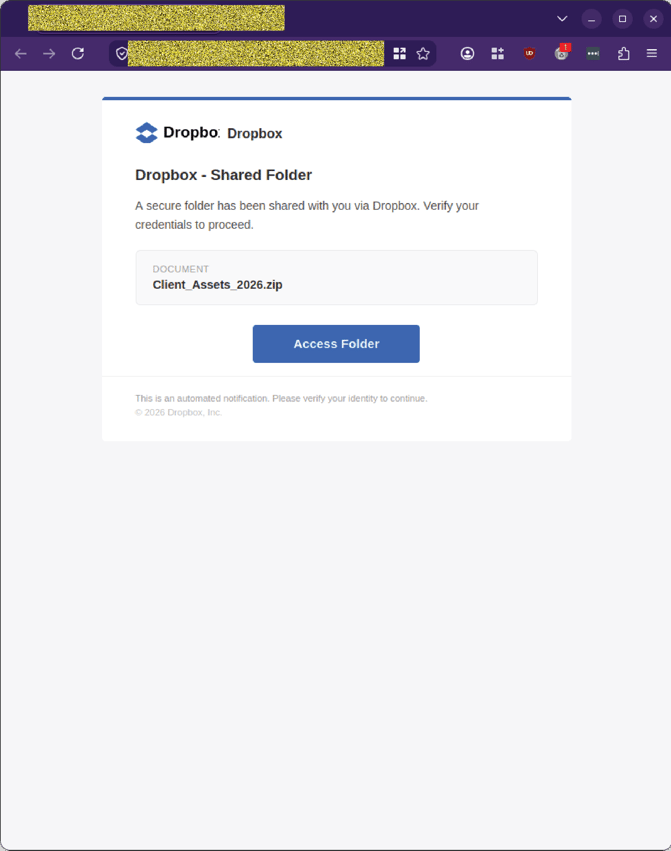 Example phishing content shown using Dropbox branding. Not affiliated with Dropbox.
Clicking Access Folder opens a new tab to:
- musairkompresor[dot]com /uploads/wilderfrress/
- which then opens avittti[dot]com /injabazmishelinktoon
Each step is designed to feel like a normal progression through a secure document‑access flow.
Step 2: Fake “Secure Document Access” verification page
The next page impersonates a DocuSign‑style secure‑document portal. It presents an encrypted file and instructs the user to copy a code, click Verify & Paste, and sign in with a Microsoft account.
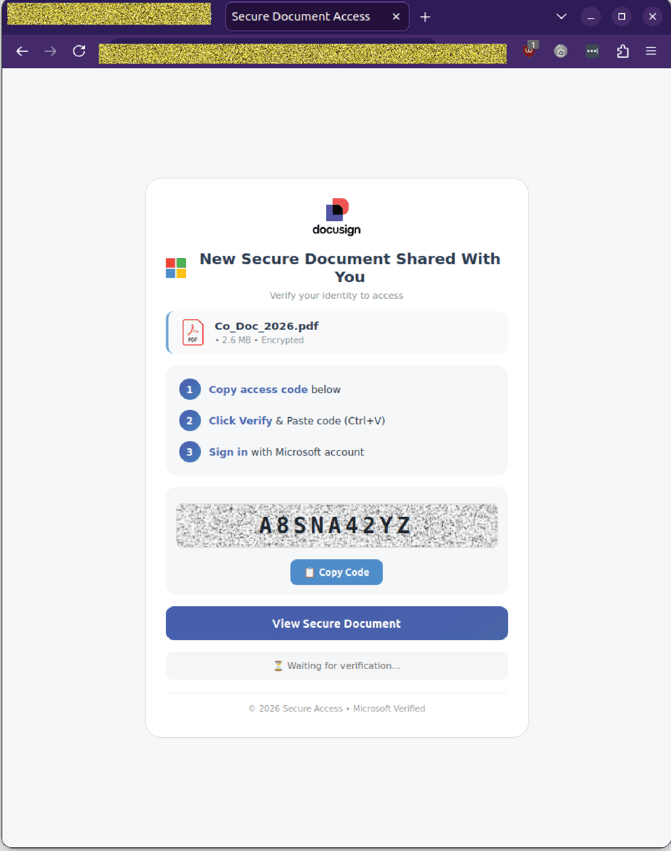 Example phishing content shown using DocuSign‑style branding. Not affiliated with DocuSign.
This is the critical pivot point. The user believes they are performing an extra security step. In reality, they are being guided into an OAuth device‑code flow that will grant attackers persistent access to their Microsoft account.
Step 3: Genuine Microsoft login page used deceptively
Clicking either button launches a legitimate Microsoft endpoint at login.microsoftonline.com, displaying:
- “Enter code to allow access”
- A field labelled Code
- A blue Next button
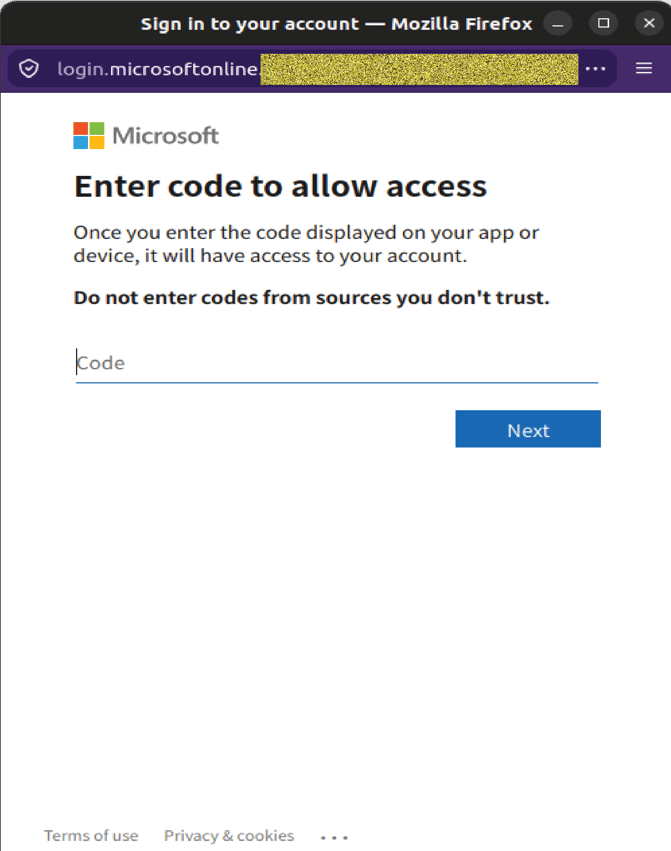 Example phishing content shown using Microsoft branding. Not affiliated with Microsoft.
Once the user enters the code and signs in, the malicious application receives tokens granting long‑term access to emails, files, contacts, SharePoint, OneDrive, and other Microsoft 365 data.
Why this scam is worth flagging to your team
-
Several details make this campaign more dangerous than a typical credential‑phishing attempt:
-
It grants full account access without stealing a password. OAuth‑based attacks bypass traditional login‑page training.
-
The pretext is mundane and plausible. Shared folders, encrypted files, and document‑completion workflows are routine business tasks.
-
The staged verification steps feel authentic. Copy‑and‑paste codes, multi‑page flows, and “Waiting for verification…” messages mimic legitimate secure‑document experiences.
-
The branding is familiar and low‑friction. Dropbox, DocuSign‑style layouts, and genuine Microsoft login screens reduce scrutiny.
-
The redirect chain uses legitimate services. link.edgepilot.com and secure-web.cisco.com make the click path appear safe.
-
For organisations whose staff regularly handle shared folders, approvals, or document workflows, this type of scam has implications far beyond individual compromise. A single OAuth consent can provide attackers with persistent access to business‑critical data.
Stay safe, know the signs.
GlobalGuard advises all recipients of these emails to delete them immediately without clicking on any links. Responding or providing personal details can lead to identity theft, data breaches, and financial losses.
Talk to our team
Reach out to speak to a GlobalGuard expert about securing your inboxes against advanced, malicious email-borne threats with our AI-powered email security solutions.
COMMENTS