

MailGuard has intercepted a new phishing campaign that impersonates Webcentral. The emails warn recipients that their domain is approaching its renewal date and invite them to sign in to review their account settings. The scam combines familiar branding, an ordinary domain renewal request and a convincing sequence of fake login and payment pages, and that combination could make the email easy to mistake for a genuine account notification.
A believable domain renewal reminder
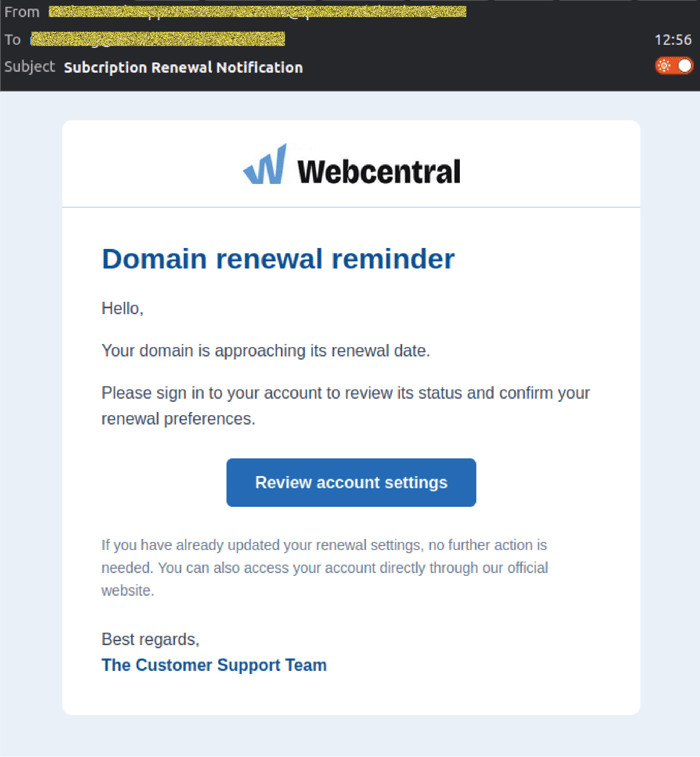
The email, titled“Subcription Renewal Notification”, arrives in a clean, professionally branded HTML layout. It features Webcentral’s logo prominently and opens with a“Domain renewal reminder” telling the recipient that their domain is approaching its renewal date.
The message asks the recipient to sign in to review the domain’s status and confirm their renewal preferences, with a prominent blue“Review account settings” button providing an obvious next step.
The email also tells recipients who have already updated their renewal settings that no further action is required, and suggests they can access their account through the official website. These additional details help give the message the appearance of an ordinary service notification rather than an overtly urgent phishing attempt.
Example phishing content shown using Webcentral branding. Not affiliated with Webcentral.
The fraudulent “Domain renewal reminder” email, impersonating the Webcentral Support Team.
Sender details that don't add up
Although the display name reads“Webcentral Support Team”, the email has no connection to Webcentral.
The display address and actual sending address observed by MailGuard are both:
service(at)ipc-immobilie[.]de
The unrelated ipc-immobilie[.]de domain does not match the company the email claims to represent, providing recipients with an important clue that the message should not be trusted.
The greeting is also generic, beginning simply with“Hello,”, with no customer name or specific domain details included in the message.
How the scam works
Step 1: The link.
The “Review account settings” button contains a single link that directs recipients to the phishing site at:
dieinsolvenzretter[.]net/central
The web address bears no relationship to Webcentral, despite the branding waiting for victims on the destination page.
Step 2: The fake login.
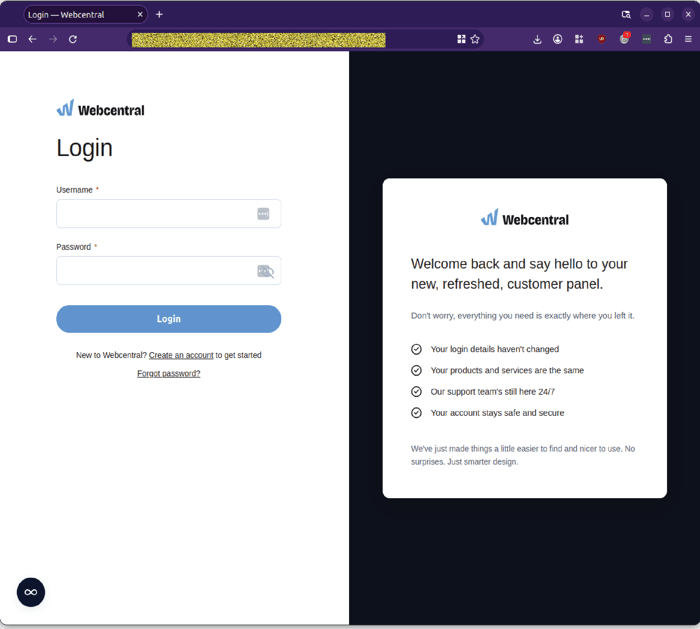
Victims land on a convincing recreation of a Webcentral login page asking for a username and password.
The fraudulent page goes beyond simply copying a logo and login box. It includes Webcentral colours and branding along with text welcoming customers to a supposedly“new, refreshed, customer panel.” A panel on the page reassures visitors that their login details have not changed, their products and services remain the same, support is still available 24/7, and their account remains “safe and secure”.
These details make the page appear like an authentic website refresh while the phishing site attempts to collect the victim's credentials.
Example phishing content shown using Webcentral branding. Not affiliated with Webcentral.
The fake Webcentral login page, which asks victims to provide their username and password.
Step 3: The payment page.
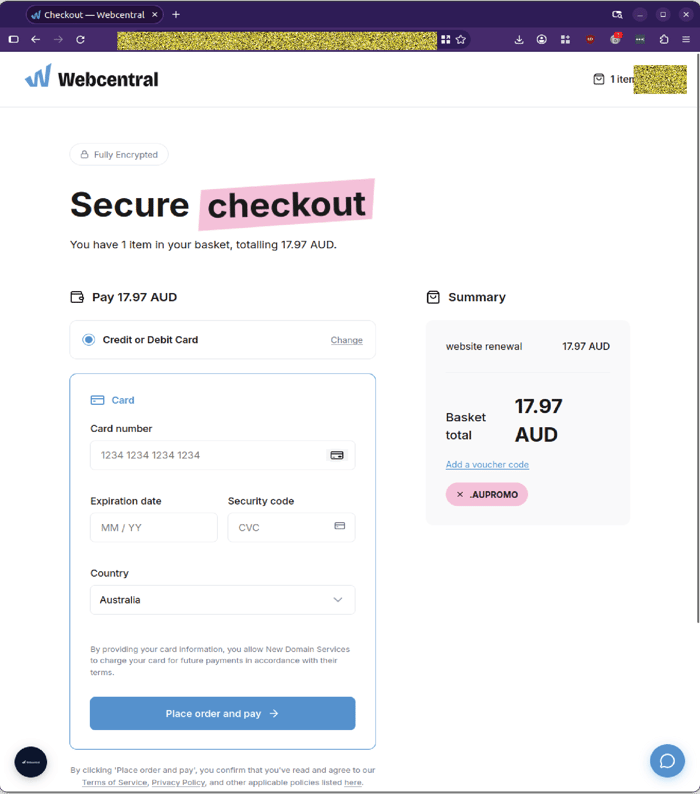
After the login stage, victims are taken to a“Secure checkout” displaying a supposed website renewal for 17.97 AUD.
The page asks victims to enter their card number, expiration date and security code, with Australia already shown in the country field. It also displays a basket summary, a voucher-code field, a“Fully Encrypted” label and a large“Place order and pay” button, all designed to resemble a legitimate online checkout.
There is an inconsistency buried in the payment form. Fine print states that providing card information allows“New Domain Services” to charge the card for future payments, despite the page presenting Webcentral branding.
Example phishing content shown using Webcentral branding. Not affiliated with Webcentral.
The fake “Secure checkout” page requesting credit card details for a 17.97 AUD website renewal.
Step 4: The security check.
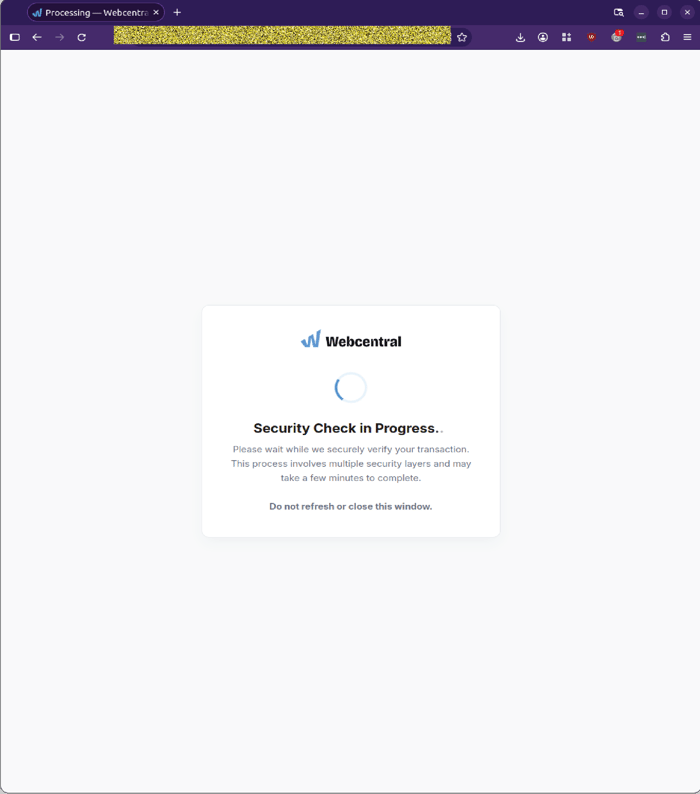
After payment details are submitted, victims are presented with another Webcentral-branded screen displaying“Security Check in Progress.”
The message claims that the transaction is being securely verified and that the process “involves multiple security layers”. Victims are specifically instructed“Do not refresh or close this window.”
The screen provides the appearance that a legitimate financial transaction is taking place while the victim remains on the phishing site.
Example phishing content shown using Webcentral branding. Not affiliated with Webcentral.
The fake “Security Check in Progress” page displayed while the supposed transaction is being verified.
Step 5: Payment refused.
The checkout then displays a red“Payment Refused” warning claiming:
“The transaction was declined by your bank. Please verify your card details and try again, or use a different payment method.”
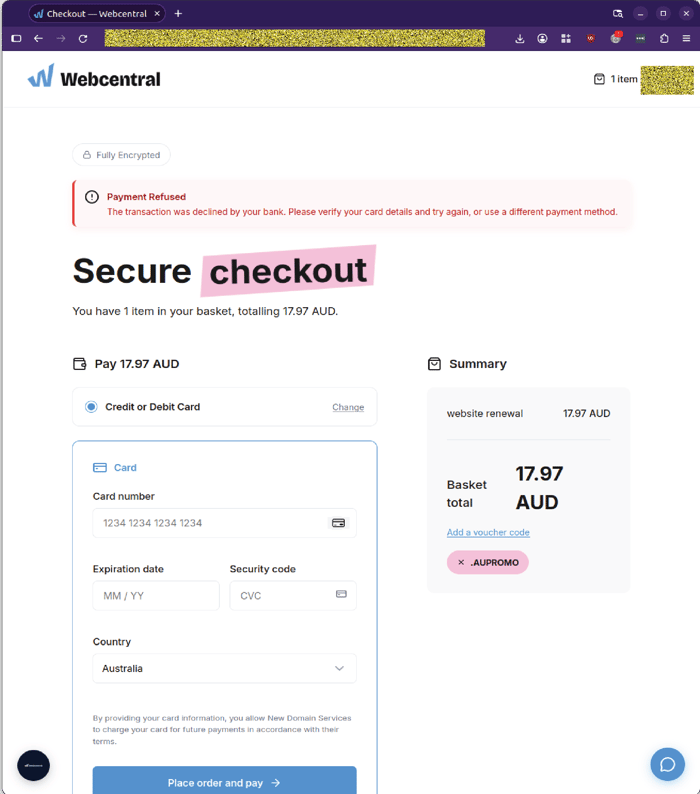
Example phishing content shown using Webcentral branding. Not affiliated with Webcentral.
The fake “Payment Refused” message asks victims to verify their card details or try another payment method.
What to watch out for
-
A generic greeting. “Hello,” rather than the customer’s name.
-
Mismatched sender details. A “Webcentral” email sent from the unrelated ipc-immobilie[.]de domain.
-
An unfamiliar web address. The phishing page is hosted at dieinsolvenzretter[.]net/central, rather than a Webcentral address.
-
An unexpected login request. The link leads directly to a page asking for a username and password.
-
Requests for payment details. Following the login, victims are asked to provide a full card number, expiration date and security code.
-
Inconsistent branding. The payment page presents itself as Webcentral but refers to“New Domain Services” in its payment wording.
-
Payment errors asking you to try again. The fake site displays a “Payment Refused” warning and encourages victims to verify their card details or use another payment method.
If you receive an unexpected domain renewal notice, access your account independently through the provider's genuine website rather than following a link in the email.
Indicators for security teams
Sender domain: ipc-immobilie[.]de
Display address: service(at)ipc-immobilie[.]de
Sending address: service(at)ipc-immobilie[.]de
Phishing site: dieinsolvenzretter[.]net/central
Subject: Subcription Renewal Notification
Amount: 17.97 AUD
Stay safe, know the signs.
GlobalGuard advises all recipients of these emails to delete them immediately without clicking on any links. Responding or providing personal details can lead to identity theft, data breaches, and financial losses.
Talk to our team
Reach out to speak to a GlobalGuard expert about securing your inboxes against advanced, malicious email-borne threats with our AI-powered email security solutions.
COMMENTS